RyderGyde
Get Roadside Assistance fast, right when you need it — plus locations, fuel rates, and maintenance.
A stranded driver doesn’t have time to figure out an app.
The Story
To understand what to design, we illustrated a roadside emergency involving Randy, a truck driver.
From Ideas to Sketches to Wireframes
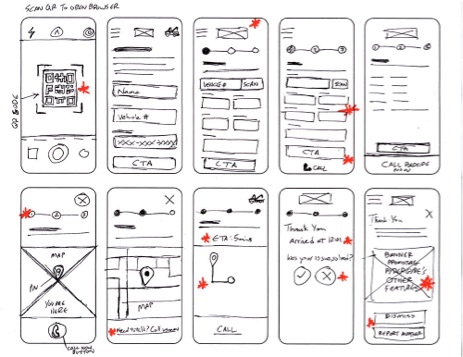
With opportunities identified, we sketched, iterated, and refined wireframes for each step of the flow. Drivers need help wherever they break down, and 91% of Americans owned a smartphone in 2024, so we designed for phones first.
Ideas to Implement
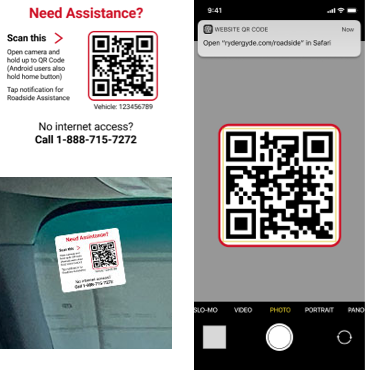
1. Use QR Codes in Cabs
All windshields on vehicles have an emergency sticker with a QR code that opens a short web address preloaded with the vehicle’s information.
2. Web Over Native Apps
Offering this as a web app instead of a native download speeds up adoption and works on any phone.
3. Eliminate Registering
Registering is the biggest hurdle with new users. If we create profiles for vehicles by their vehicle number, then the driver’s name is all that is needed at check-in for a complete profile.
Sketches
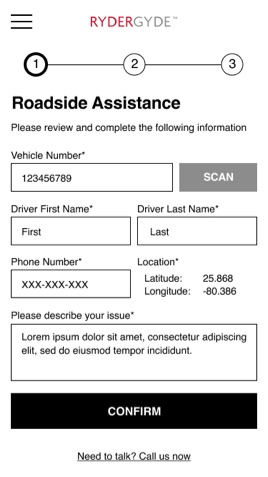
Complete information
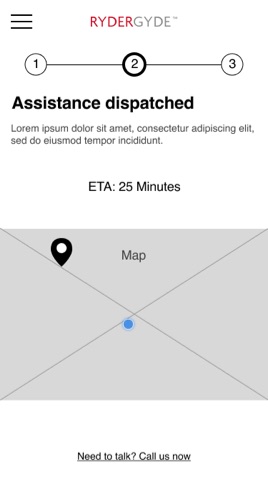
Assistance Dispatched
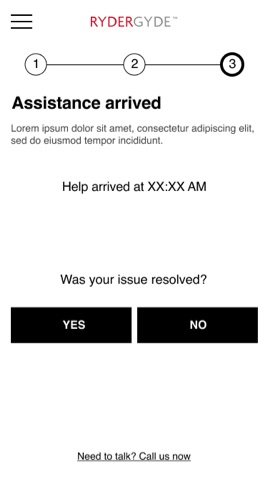
Assistance Arrived
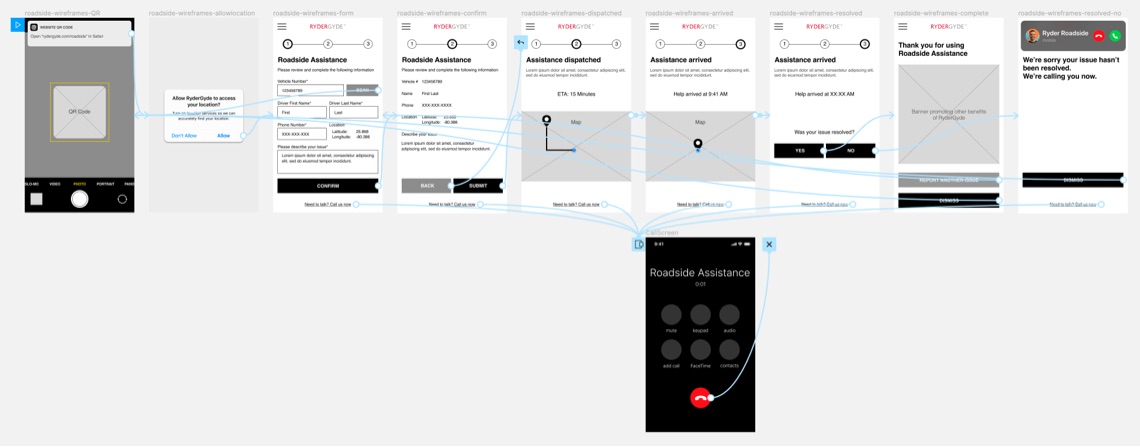
Low-Fidelity Prototype & Testing
Observing users interacting with prospective designs is crucial to finding out whether the designs work in practice.
Summary
After assembling a lo-fi prototype to demonstrate a truck driver’s journey to secure help from Roadside Assistance, I conducted live usability studies with 12 truck drivers at an actual Ryder truck facility, 30 minutes each.
Tasks
- Scan the QR Code
- Complete the simple form
- Receive assistance
Results
Based on live usability studies with 12 truck drivers at an actual Ryder facility, 30 minutes each, asking each to scan the QR code, complete the form, and receive assistance.
100% successfully received Roadside Assistance
“Better than being put on hold”
100% found the app useful
“Saves so much time”
100% reacted positively
“I wish I knew about this before today”
92% would use it in the future
“I just want help as fast as possible”
Results were overwhelmingly positive on the first round, so no retest was needed — the team moved straight to high-fidelity mockups.
Final Prototype
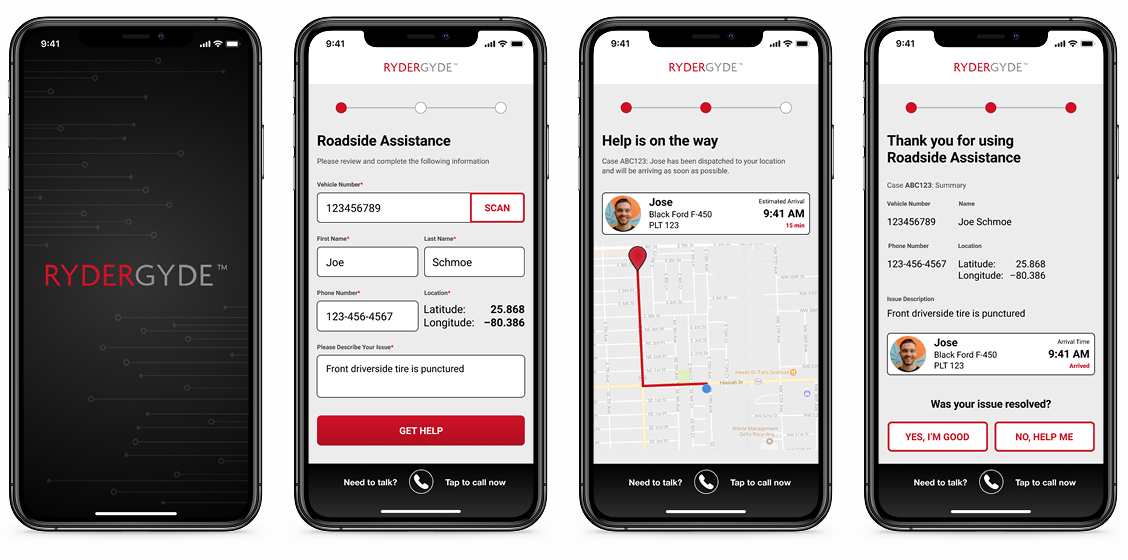
The final step before handing off our designs to the development team was to take our high-fidelity mockups and create a working prototype. It anchored stakeholder presentations, helped us verify final details with testers, and gave developers a visual reference to build from.
Beyond Roadside Assistance
Roadside Assistance wasn’t the only friction point drivers dealt with on the road. Fuel expense reconciliation was entirely manual — drivers turned in paper receipts, and accountants had to sort, match, and enter each one by hand before fuel taxes could be reported correctly across states. It was slow, error-prone, and pulled accounting time away from higher-value work.
I designed a mobile flow letting drivers photograph and submit fuel receipts directly from the road. Each receipt is logged digitally and organized for International Fuel Tax Agreement (IFTA) reporting, replacing the physical stack of paper receipts accountants previously reconciled by hand.
Lessons Learned
1. Technology has its time
In a pre-pandemic world, QR codes were a forgotten craze even though native camera apps can scan them. But now that people don’t want to touch anything, they’ve become commonplace, proving that integration and usefulness are necessary for technology to be accepted.
2. Web apps are powerful
A Progressive Web Application (PWA) is a quick and cost-effective way to provide a simple experience for any user across platforms through a browser. For this project, its simplicity helped with user adoption and convenience.
3. No more registering
A huge hurdle for new users is getting them to register. Not only is it a hassle, signing up for yet another app, but it can be a deal breaker. By eliminating this hurdle for drivers, we can quickly get them the assistance they desperately need and possibly win over a new user for the native app.